It’s been a while since I updated this blog, but today’s update is about how fast AI has evolved, how I applied it to Plankton, and why I threw the old code and app into the garbage bin.
When I wrote Plankton more than 1 year ago, I wanted to study the changes in .NET, since I hadn’t touched the framework for a few years and was curious to see what had changed and what I could achieve using Claude Code, an exploration project.
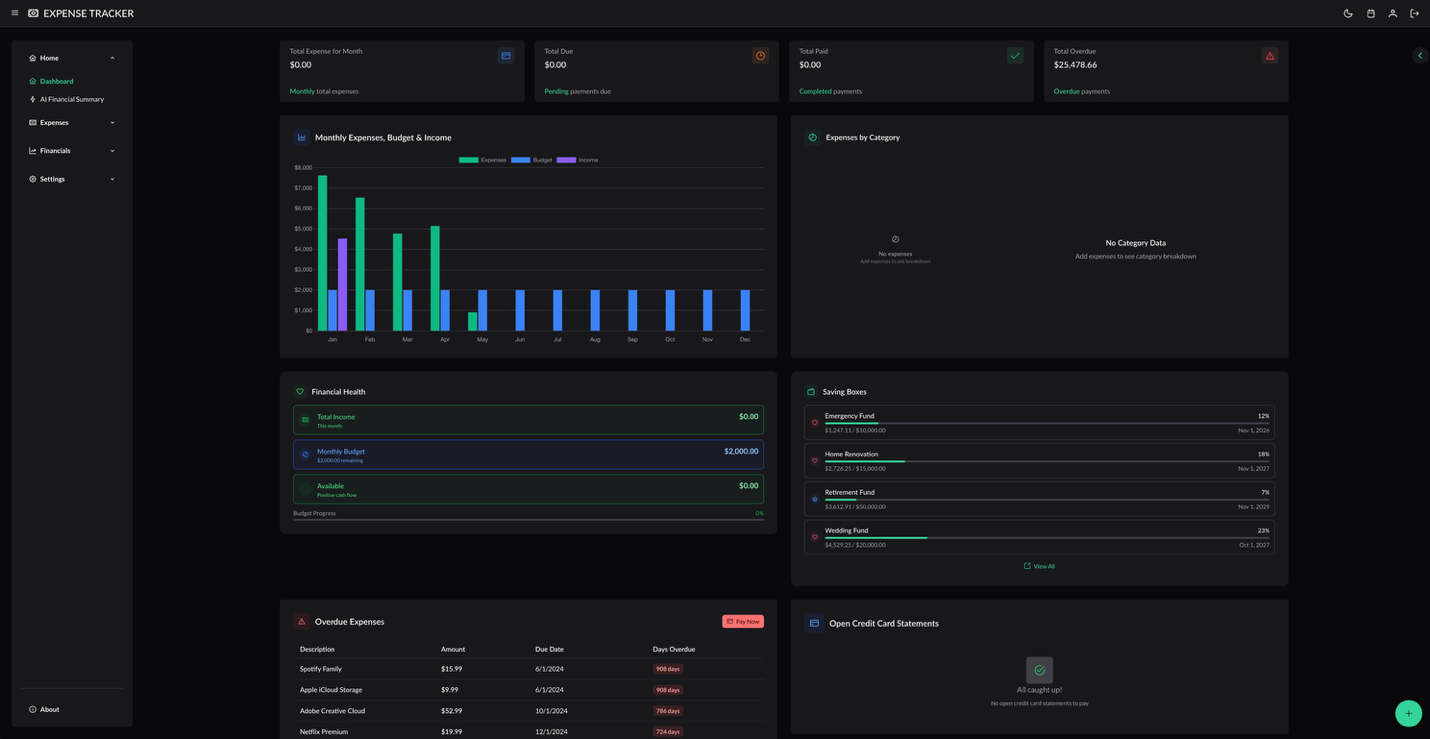
I decided to use a hybrid approach: the backend was coded in a more “traditional” way (i.e., by hand), and the front end relied entirely on Claude Code, since FE work isn’t really my area of expertise.
The model used during the development of Plankton V1 was Sonnet. I don’t remember the version, but I clearly remember how it struggled with UI work. It made too many errors and often forgot instructions and configurations. Getting the UI where I needed it took many rounds of prompting and consumed way too many tokens. The end result was a codebase with significant duplication, especially in CSS and scripts. I think the model wasn’t very good at reusing code then, or the context window was too small for my plan.
Getting the mobile app working with MAUI was a nightmare; the AI model struggled a lot, the code kept breaking, the UI didn’t render properly, and it looked a lot like old-school WinForms, with files full of garbage code and so much duplication that it was hard to track.
Despite all those issues, I got a fully functional app, deployed it to DigitalOcean, and saw it running with telemetry, authentication, and even passkey integration. The mobile app was up and running in the Simulator and on a real device as well. The Plankton project was a great way to see how things were going and where the AI could take us.
Lessons Learned with Plankton

All of this was extremely useful; I learned about the limitations, how to improve the process, what I was doing wrong, and what I was doing right. A few things I noticed:
- Using chat alone to code an entire app is not viable. You reach the context limit very easily, and once compaction occurs, memory becomes fragmented, which caused many of the issues I had.
- A well-defined scope and specification are even more important now; otherwise, the model will not fully understand what needs to be done and will hallucinate frequently.
- Testing and validation became even more important.
- You still need a really good designer; otherwise, things can look really bad 😄
But things move fast
But even after reviewing everything last year, I was surprised by how quickly things progressed. Models improved significantly, agents became more intelligent, with new tools becoming available every day.
I once saw a presentation about a massive codebase migrated from Rails to Rust using swarms of agents, with the agents generating the code and tests; humans only set the validation and testing rules. One interesting aspect of this migration was the validation approach: they ran the new and old apps side by side, feeding errors found in the new app back into the AI loop. New tasks were then automatically created, and the agents worked on them. This approach even uncovered issues in the old codebase that had already been fixed in the new one, issues that had previously gone undetected. A system that had taken years to build was migrated into a complete Rust codebase in 90 days. That’s extremely impressive.
Let’s Try Again
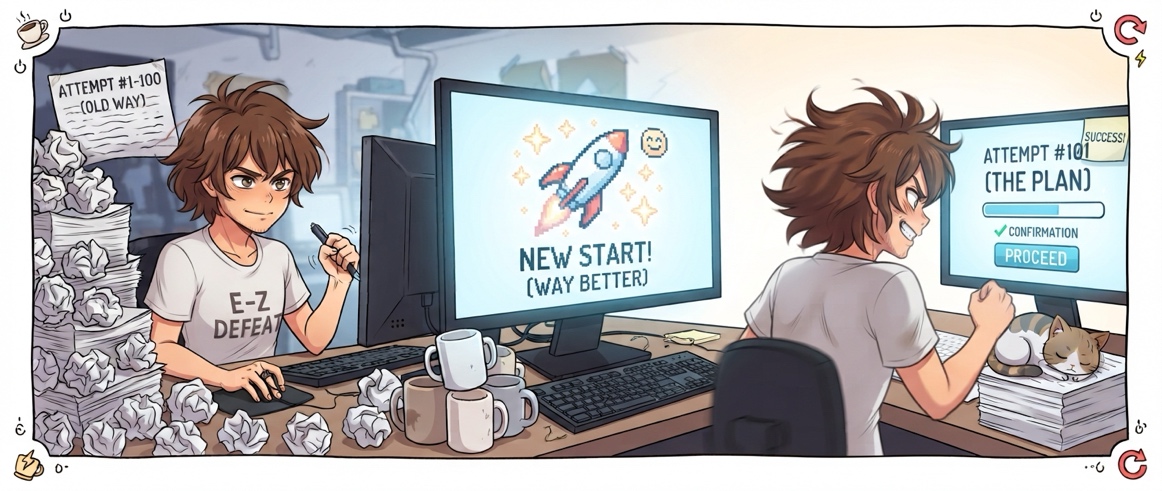
Seeing that, I decided to go back to Plankton and see how things would work now. I decided to use a different approach with the following steps:
- Specification document: Created a Markdown document detailing all the features I wanted in the App, without mentioning any code from Plankton, only functionality
- Defined a validation process: how each functionality would be validated and tested to make sure it worked;
- Infrastructure definition: Defined the entire tech stack and security requirements, what plugins to use, where to store the files;
- Agents’ configuration: ten specialized agents, each owning its own part of the code:
- The Architect
- Data persistence
- Backend API
- Plaid integration
- Jobs and notifications
- AI insights
- Web front-end
- Mobile app
- QA and tests
- DevOps
- Memory file: A memory file configuration where the agents would write back points and references to avoid problems during execution
Once everything was well defined, I used Claude Code to read the context file and begin work. It automatically created the project structure with the latest versions of all components, including .NET, Sakai, Vue, and Docker. From there, I just watched the agents work. The architect decided to split the entire project into 7 phases, some with their own sub-phases. I did not specify that. The backend API and basic UI were built, everything was tested, and the project was sent back to me for validation.
Was it perfect? No, not really, but it was damn close. I reviewed the code and found no oddities. No duplication, no strange names, nothing out of place, and reusable code with helpers in place. Everything looked just fine. I requested a few tweaks, and the architect decided to add new phases to address the issues.
As the agents worked, one of the deliverables I requested was that every time the API was modified, a full Insomnia project file be provided and updated so I could manually check the API functionality, the payloads, the API structure, URLs, headers, everything. It was extremely impressive, sometimes jaw-dropping.
Basically, what took me weeks to get running with Plankton V1 took hours with V2. The issue wasn’t the model; it was my token usage limit. It didn’t look at the Plankton V1 code, but with a well-defined specification and model advancements, it fixed every issue I had with V1. I had to intervene very few times, mostly for UI taste and preference rather than code issues. Not everything from V1 is there yet, though: passkeys and the mobile app are still on the roadmap.
It’s not really V2; it’s a new thing
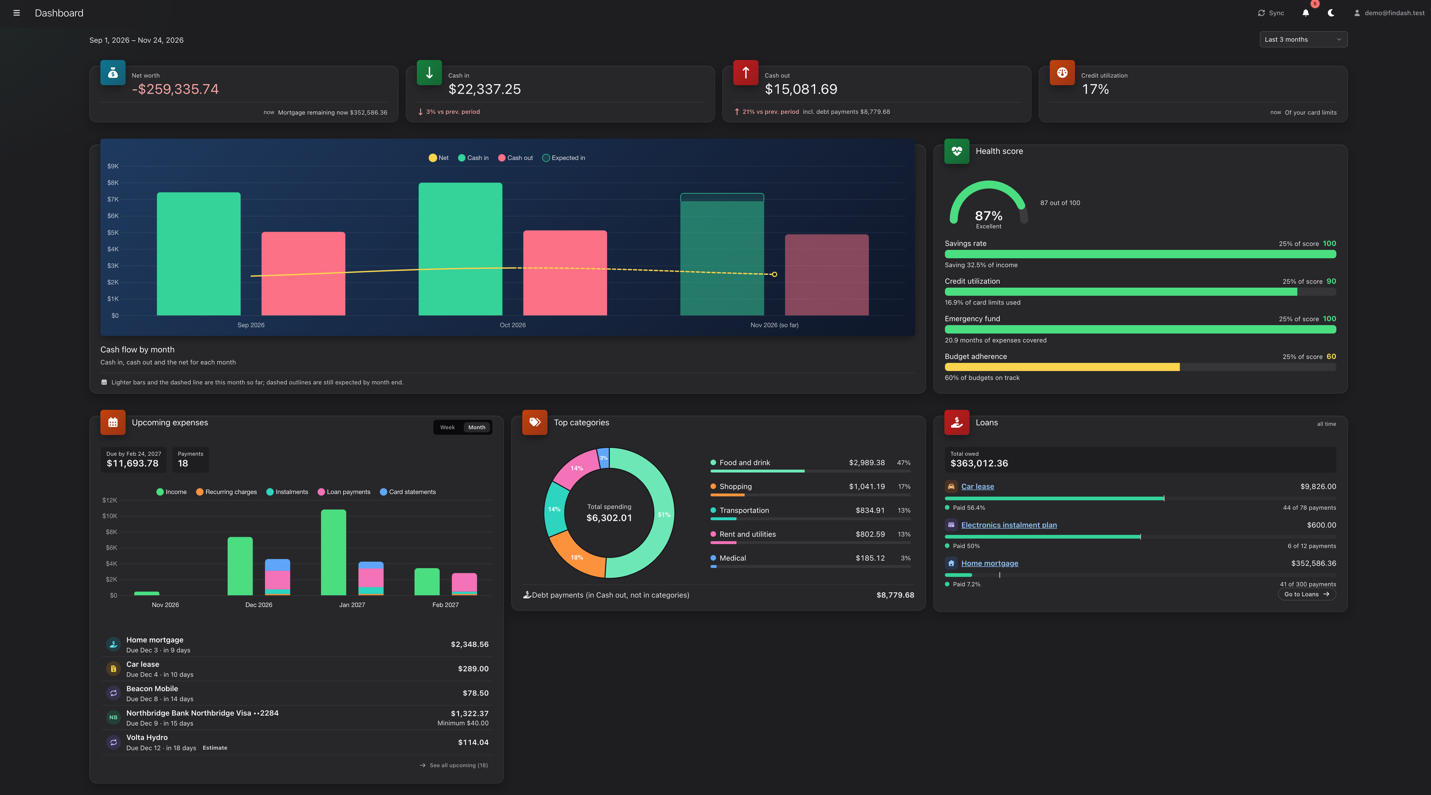
And Plankton V2 isn’t just a rewrite of the old app; it’s an entirely new thing. It’s more complex, more sophisticated, and more intelligent, capable of things the old app couldn’t even dream of.
I didn’t want to enter data manually or import a CSV file. No way; I wanted it to be automatic. I searched the web and found that it’s possible to load your bank and financial information using Plaid’s API. This lets you connect your bank account and load card accounts, mortgage information, loans, and investments. Basically, everything, as long as your bank is on Plaid’s compatibility list.
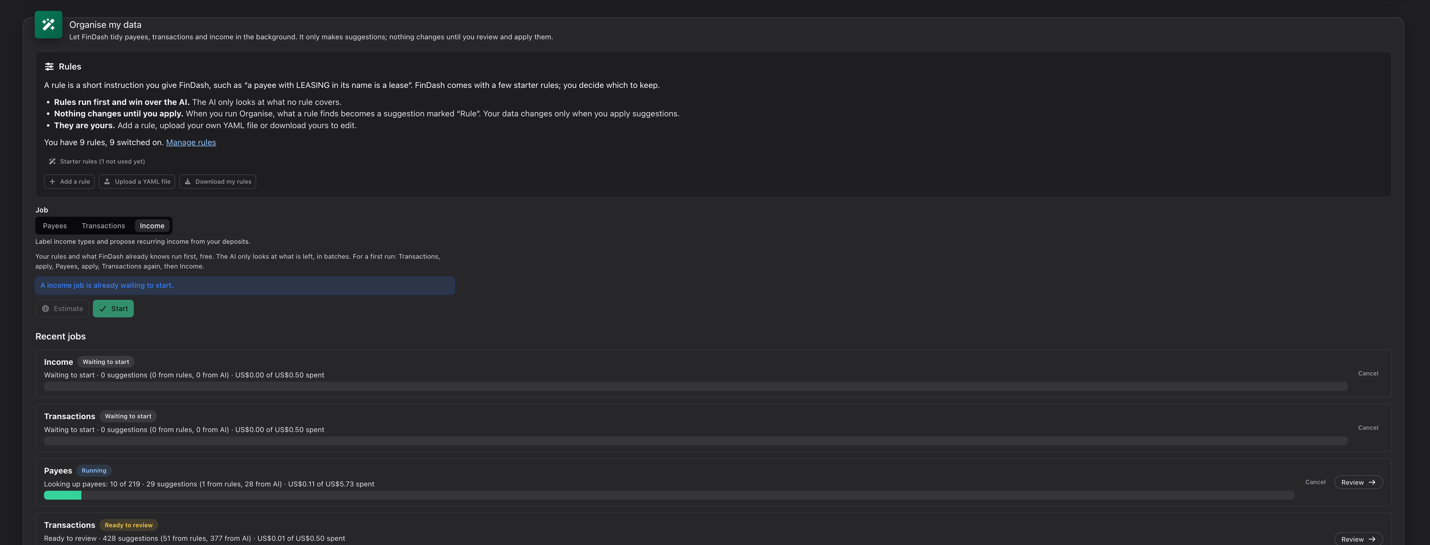
But that’s not all. I don’t want to organize this manually, so I added an API connection to Claude, using Haiku here. Once the information is fetched from the Plaid API, the app first applies a set of rules (defined in a YAML file you can import and edit), and Claude fills in everything the rules don’t cover: the correct category, type, and payee for each transaction. Is it an expense or income? Is it recurring? A subscription? A utility bill? All of this should be organized automatically, and nothing changes until the user reviews and applies the suggestions.
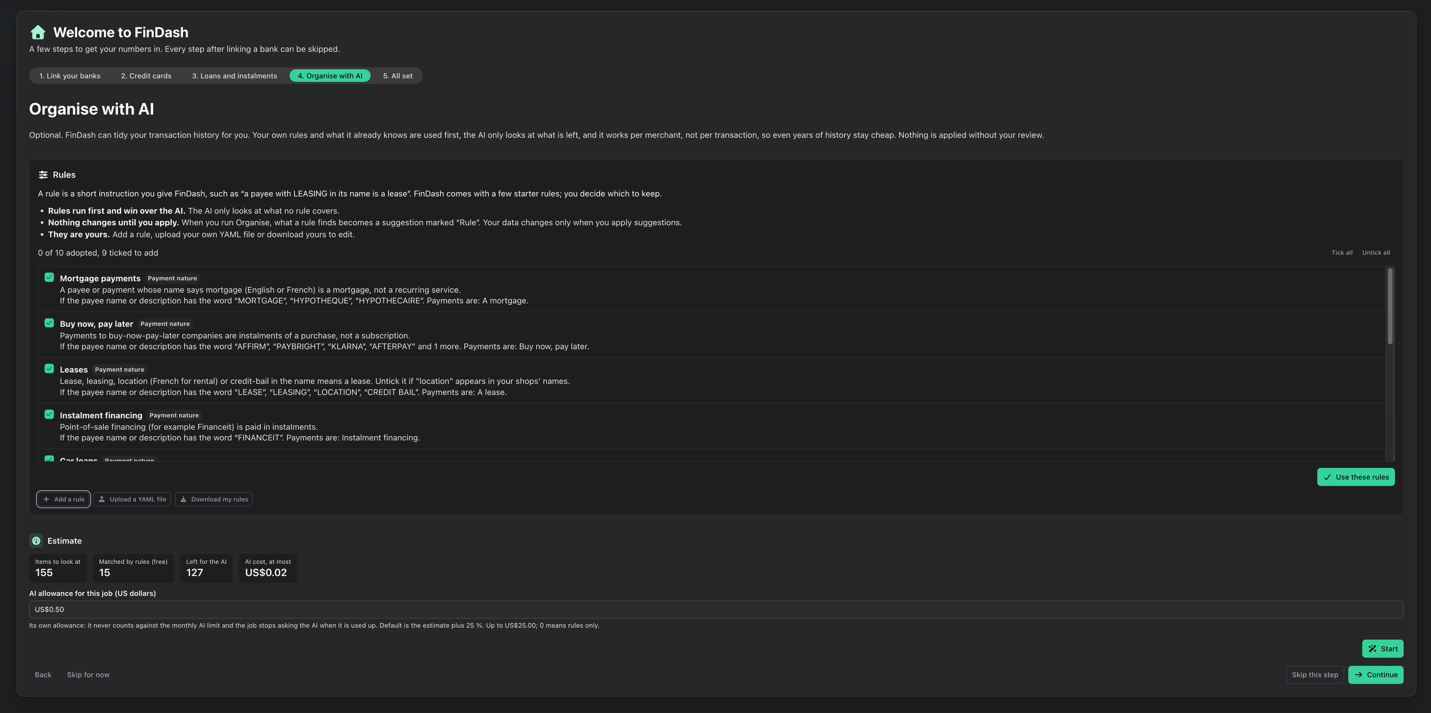
The user can set an AI budget and preview the cost of running each feature. The app auto-syncs to fetch data from the Plaid API via a job and supports manual sync, budget definition, and notifications.
Where the Human Still Mattered
As I mentioned earlier, not everything was smooth sailing, and this is where the “Human vs AI” part comes in. A few examples include:
- Shortcuts: to distinguish loans and leases from subscriptions, the agents hardcoded the names of my car-finance company and my installment lender directly into the code. It worked for my data, but it was the wrong solution. I asked for it to be removed. Now there is a YAML rule file that anyone can edit and import, and the AI handles everything the rules don’t cover.
- Real-world data: my bank reported the same mortgage twice, once as a balance owed and once as a separate account with the same amount. No specification would have predicted that; I had to spot it.
- Taste: most of my interventions focused on the UI, spacing, and icon placement on a card. The agents can build almost anything, but they still need someone to say, “This looks wrong.”
- Trust, but verify: once, a task was reported as done while a test was still failing. Defining the tests and the validation process up front is what caught it.
And since the app reads real bank data, security was part of the specification from day one: bank access tokens are encrypted, no secret ever goes into the code, and the agents only ever work against Plaid’s test environment, never my real data.
Conclusion
The AI advancements are undeniable; the progress over the past year is stunning and sometimes scary, but I believe this will enable us to achieve far more than we expect in the future. Might this also lead to human destruction? Probably… eventually, but we were already heading in that direction anyway… 😉
In the future, I’ll write a post about V2, its new features, and how each one works. Until then, here is the full V2 tech stack:
Backend
- Runtime: .NET 11 (release candidate) with ASP.NET Core
- API: FastEndpoints 8, one class per route, all under
/api/v1, with an OpenAPI document - Architecture: clean architecture with Domain, Application (one use case per operation), Infrastructure, API and shared Contracts projects
- Database: PostgreSQL 18 through EF Core 11 and Npgsql, with case- and accent-insensitive text search
- Authentication: ASP.NET Core Identity with email and password plus Google and Apple sign-in, JWT access tokens and refresh tokens
- Background jobs: Hangfire on PostgreSQL, for the bank sync every 4 hours, the AI organize jobs and alerts
- Observability: Serilog and OpenTelemetry
Bank data and AI
- Banking: Plaid through Going.Plaid, with Hosted Link to connect banks, transaction sync, balances and loan and mortgage details
- AI: the Claude API through Anthropic’s official C# SDK. Sonnet writes the monthly reports, answers questions and explains unusual activity; Haiku categorizes transactions, looks payees up on the web and organizes the data
- AI costs: prompt caching, a monthly AI budget per user and a cost estimate before each run
- Rules: YAML rule files (YamlDotNet) that run before the AI and always win over it
- Notifications: Firebase Cloud Messaging
Web app
- Framework: Vue 3.5 with TypeScript, built with Vite
- UI: PrimeVue 5 on the Sakai template, Tailwind CSS 4 and Font Awesome Free icons
- State and charts: Pinia, Vue Router and Chart.js
- API client: generated from the OpenAPI document with openapi-typescript and openapi-fetch
Mobile
- App: .NET MAUI for iPhone, iPad and Mac (Mac Catalyst), with MVVM. Only the project skeleton exists so far; the screens come later
Infrastructure
- Local development: .NET Aspire, which starts PostgreSQL, the API, the web app and file storage with one command
- Deployment: Docker Compose with Caddy for HTTPS, the API, PostgreSQL 18, SeaweedFS (S3-compatible file storage) and database backups
- CI: GitHub Actions
Testing
- Backend: xUnit v3, Shouldly, NSubstitute and Testcontainers, which runs the integration tests against a real PostgreSQL. About 4,200 tests
- Web: Vitest, about 3,900 tests
- Manual checks: an Insomnia collection kept up to date with every API change
The Music
And of course, I would not forget to add the music to the post. Here is one track that has been playing a lot in my head from an epic segment of GTA 6.